


WHY UNDERSTANDING SOCIAL MEDIA VIDEO MAKER PRICING MATTERS FOR YOUR BUSINESS
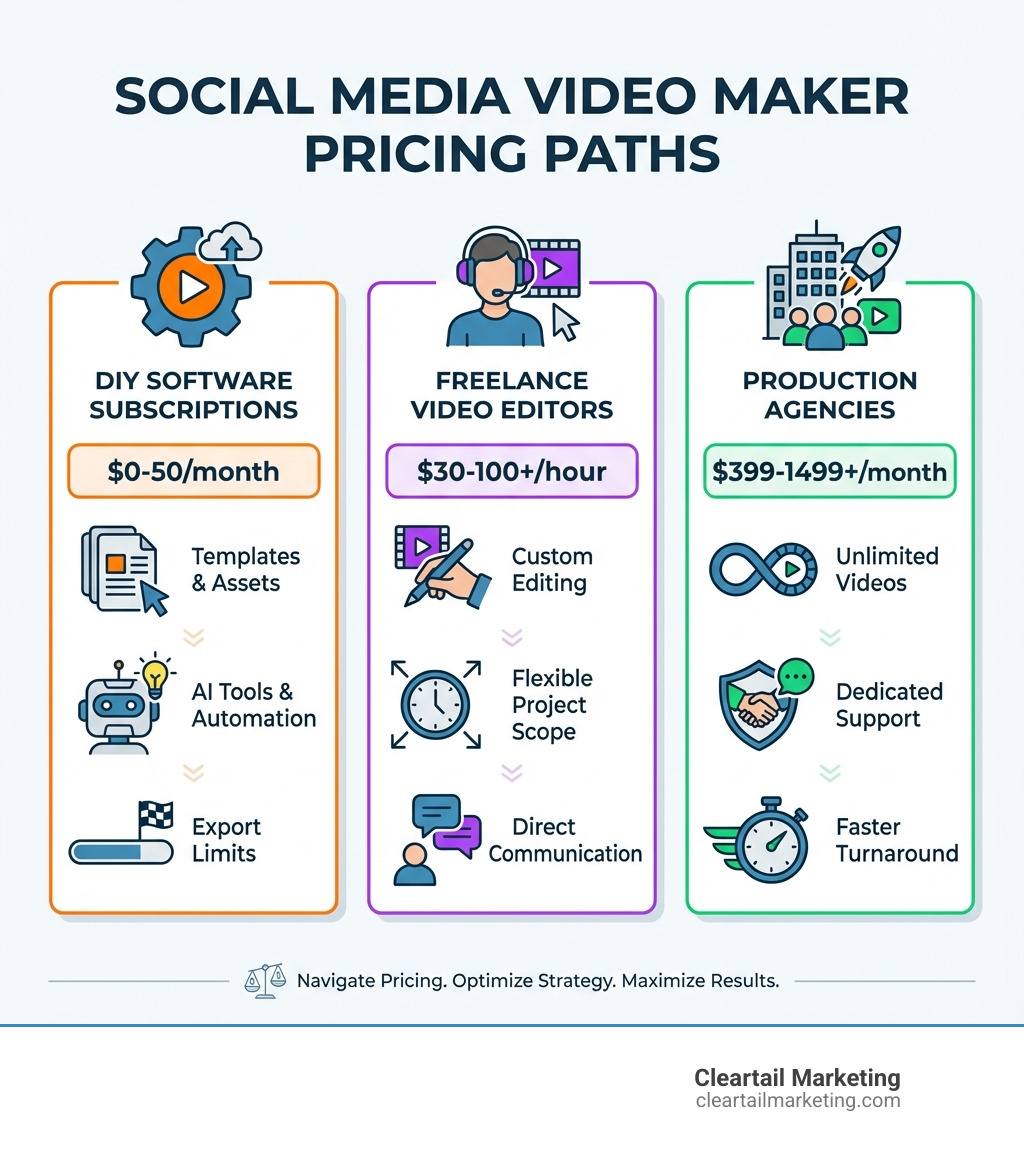
Understanding social media video maker pricing is crucial, as costs vary widely. DIY tools can be free or cost up to $50/month, freelance editors charge $30-$100+ per hour, and agency packages often start at $399-$1,499/month. Businesses typically choose one of these three paths: DIY software, freelance talent, or a production agency.
Here’s a quick breakdown of typical costs:
| Option | Price Range | Best For |
|---|---|---|
| DIY Software | $0-$50/month | Small businesses testing video content |
| Freelance Editors | $30-$100+/hour | Occasional projects with custom needs |
| Video Agencies | $399-$1,499+/month | Regular content production at scale |
Video is essential for engagement on all platforms, from Facebook and Instagram Reels to TikTok and LinkedIn. However, the pricing for video creation tools can be confusing, with varying models like per-minute charges, credit systems, and subscriptions with hidden limitations.
A free plan might seem appealing, but watermarks and low resolution can undermine a professional brand, especially for paid ads. The challenge is matching your needs to the right service. Sometimes, the bottleneck isn’t the tool but the time and skill to use it, which is where freelancers and agencies become valuable.
I’m Magee Clegg, founder and CEO of Cleartail Marketing. We’ve helped over 90 B2B companies steer video pricing to develop cost-effective strategies that deliver measurable results. Through years of testing platforms and working with talent, I’ve learned what works at different budget levels.
UNDERSTANDING DIY SOCIAL MEDIA VIDEO MAKER PRICING MODELS
DIY software is often the first stop for businesses exploring video. It promises control and speed, but understanding the social media video maker pricing models is key to knowing what you’re actually paying for.
FREE VS. PAID PLANS: WHAT’S THE REAL DIFFERENCE?
Nearly every video maker offers a free plan to let you try the software, but the differences between free and paid tiers are significant for business use.
Free plans almost always include a watermark on exported videos, which looks unprofessional for client-facing content or ads. They also typically limit export quality to 720p, which lacks the crispness of the 1080p (full HD) or 4K quality available in paid plans. Other common free-tier restrictions include shorter video length limits (e.g., 5-10 minutes) and limited storage duration (e.g., videos deleted after 3 days).
Upgrading to a paid plan removes these limitations and open ups a trove of premium templates, advanced editing features, and powerful AI tools. While a free plan might offer basic AI clips, paid tiers provide access to AI video generators, silence removal, and a wider array of generative credits, enabling more efficient and professional content creation.
To truly understand what you’re getting, we encourage you to look at our guide on More info about social media content packages.
SUBSCRIPTION TIERS AND CREDIT SYSTEMS EXPLAINED
Most platforms use either a tiered subscription model or a credit-based system. A simple way to save is by choosing annual billing, which almost universally offers a significant discount over paying monthly.
Credit-based models are also common. In these systems, you purchase “credits” or “minutes” that are consumed when you export videos or use certain features. For example, Vidyo.ai and Quso.ai allocate a set number of minutes per month. The challenge is predicting your usage, as quotas often don’t roll over. This model can be cost-effective for predictable usage but may lead to unexpected costs if your output fluctuates.
Some higher-tier plans offer unlimited exports, which is invaluable for high-volume content production. However, always check for other limitations, like storage caps or the number of social accounts you can connect. Also, be aware of potential hidden fees for add-ons like extra credits or specific advanced features. It’s crucial to read the fine print to understand the full cost.
For a comprehensive look at how these pricing structures are presented, we recommend checking out an Example of a pricing page.
A LOOK AT SOCIAL MEDIA VIDEO MAKER PRICING EXAMPLES
To illustrate the variety in social media video maker pricing, let’s compare the plans of a few popular platforms.
| Feature/Platform | Vmaker (Entry/Growth) | Quso.ai (Entry/Growth) | Vidyo.ai (Entry/Growth) |
|---|---|---|---|
| Free Plan | Yes (3 YT publishes, 720p, 5 min export, 60 sec generative credits) | Yes (75 Credits/mo, 720p, watermark) | Yes (75 mins/mo, 720p, CutMagic, 30-day retention) |
| Entry-Level Paid Plan | Starter: ₹1799/month (billed yearly) | Lite: $24/month (billed monthly) | Essential: $21/month (billed annually) |
| Growth/Higher-Tier Paid Plan | Teams: ₹2499/month (billed yearly) | Growth: $40/month (billed monthly) | Growth: $25/month (billed annually) |
| Key Features (Entry) | 10 video downloads/mo, 1080p, 30 min export, 3 min generative credits/mo, 80 AI Avatars | AI Clips & Captions, AI Video Generator, AI Video Resizing, Unlimited 1080p Exports | 300 mins/mo, 1080p, Intelliclips, schedule to 6 platforms |
| Key Features (Growth) | 30 video downloads/mo, 2k, 45 min export, 12 min generative credits/mo, 99 AI Avatars, Green screen removal, Branded player | Unlimited social post scheduling, Bulk publishing, Advanced AI Analytics, Custom templates & brand kit, Priority support | 600 mins/mo, 1080p, Custom Brand Kit & templates, Metadata, Viddy AI assistant, Full transcripts |
| AI Tool Access | AI Avatars, Generative Credits, Auto Subtitle, Subtitle Translation | AI Clips & Captions, AI Video Generator, AI Video Resizing, AI Filler & Silence Removal, AI Influencer, AI Writer | Intelliclips, CutMagic, Viddy AI content assistant |
| Social Media Scheduling | Schedule social posts (Vizard Creator/Business, not explicitly Vmaker) | Direct TikTok Publishing (Free), 1-Click Schedule to 7 Social Platforms (Essential+), Unlimited Social Post Scheduling (Growth) | Direct TikTok publishing (Free), Publish/schedule to 6 social platforms (Essential+), Unlimited Social Post Scheduling (Growth) |
Note: Vmaker pricing is in INR (₹) and is billed yearly, while Quso.ai and Vidyo.ai are in USD. Quso.ai shows monthly billed prices, but offers significant savings for annual billing.
As the table shows, paid plans generally fall between $15-$40/month for entry to mid-tier options. As you move up in price, you gain access to higher export quality, more generous credit allowances, a wider suite of AI tools, and integrated social media scheduling. These features can significantly speed up content creation and streamline your workflow, justifying the investment for businesses serious about video.
HIRING HELP: FREELANCERS VS. AGENCIES
When DIY tools aren’t enough due to time constraints or the need for a specific creative vision, outsourcing is the next step. The two main paths are hiring a freelance video editor or partnering with a video production agency, a decision that balances cost, control, and the level of support you need.

THE COST OF HIRING A FREELANCE VIDEO EDITOR
Hiring a freelance editor offers a flexible, cost-effective solution for project-based work. Understanding their social media video maker pricing is key to budgeting effectively.
Freelancers typically charge in a few ways:
- Hourly rates: This is the most common model. Rates range from $10-$30/hour for basic work to $30-$100/hour for professional editing. Highly specialized skills can command $100-$300+ per hour. For quality work, expect to pay $50/hour and up.
- Per-minute rates: Some editors charge per minute of finished video, which can range from $10 to $50+ for professional work.
- Day rates: If you also need filming, a videographer’s day rate can range from $300 to $3,500+, with editing billed separately.
Costs are influenced by the editor’s experience, project complexity, footage quality, and turnaround time. Rush jobs and additional elements like licensed music or special effects will increase the price. Hiring a freelancer is great for occasional, custom projects but requires you to manage the process and provide clear direction.
For a deeper dive into managing various aspects of our online presence, including how much it costs to manage social media, check out our insights on How much it costs to manage social media.
PRICING FOR VIDEO PRODUCTION AGENCIES & “UNLIMITED” SERVICES
For a more comprehensive, hands-off solution, a video production agency or an “unlimited” editing service is an attractive option. While the social media video maker pricing is higher, these models offer scalability and a broader range of services.
Video Production Agencies typically work on project-based rates, quoting a single price for an entire project from pre-production to final delivery. Costs can range from $5,000-$20,000 for small projects to over $40,000 for large-scale productions. Agencies provide a dedicated team and higher production value, reducing the burden on your internal staff.
A newer model is the “unlimited” video editing service, which operates on a flat monthly subscription. These services, with prices typically starting around $1,000/month, are ideal for businesses needing a steady stream of social media content. For example, a service like Videotter offers packages from $399/month for one video to $1499/month for unlimited videos with a dedicated editor and faster turnaround.
Benefits of “unlimited” services include:
- Predictable monthly costs
- Consistent content output
- Faster turnaround times
- Included revisions and dedicated support
These services offer significant value by handling the entire video creation process, making them well-suited for businesses with high-volume, ongoing content needs.
To explore how these services fit into a broader marketing strategy, we recommend reviewing More info about social media management services.
KEY FACTORS THAT INFLUENCE SOCIAL MEDIA VIDEO MAKER PRICING
The final price for your social media video content is shaped by more than just a subscription plan. Various technical and feature-related factors significantly impact the overall social media video maker pricing, and understanding them helps optimize your budget.

HOW EXPORT QUALITY AND VIDEO LENGTH AFFECT COST
Simply put, higher quality and longer videos require more resources, which increases the cost.
Export quality is a primary example. Free plans typically limit you to 720p (Standard Definition), which is acceptable for casual posts but can look unprofessional. Paid plans open up 1080p (High Definition), the industry standard for crisp, engaging video, or even 4K Ultra HD for maximum visual impact. The higher the quality, the more expensive the plan, reflecting the increased server resources needed.
Video length also plays a crucial role. Free plans often impose strict duration caps (e.g., 5-10 minutes), encouraging an upgrade for longer content. Paid plans extend these limits significantly or offer “unlimited” length, a critical feature for webinars, interviews, or detailed tutorials. If you anticipate creating longer-form content, you’ll need to budget for a higher-tier plan from the start.
Understanding these constraints helps you align your content strategy with your chosen plan, ensuring you get the most value for your money. To see how these considerations fit into a broader content strategy, check out our guide on More info about social media marketing plans.
HOW ADVANCED FEATURES IMPACT SOCIAL MEDIA VIDEO MAKER PRICING
Beyond the basics, advanced features are a major driver of social media video maker pricing. These tools save time and boost creativity but are typically reserved for higher-cost plans.
-
AI Tools: Artificial intelligence is revolutionizing video creation. Features like AI-generated clips, automatic video resizing, and silence removal (offered by platforms like Quso.ai and Vidyo.ai) automate tedious tasks but are almost exclusively found in paid tiers.
-
Custom Branding: Maintaining brand consistency is crucial. Paid plans often include brand kits to upload your logos, colors, and fonts, ensuring all videos align with your brand identity. Some even offer branded video players for embedding on your website.
-
Team Collaboration Features: For agencies or marketing teams, tools for collaboration are essential. Higher-tier plans provide shared workspaces, multi-user access, and the ability to manage numerous social media accounts, which is vital for scaled operations.
-
Enterprise-Level Solutions: For large businesses with stringent security requirements or high-volume needs, custom enterprise plans are available. These often include improved security, API access for custom integrations, and dedicated account managers for personalized support.
These advanced features transform a simple editing tool into a powerful content creation hub, directly contributing to the higher cost of premium subscriptions.
FREQUENTLY ASKED QUESTIONS ABOUT VIDEO MAKER COSTS
Navigating social media video maker pricing can be confusing. Here are answers to some of the most common questions we hear.
WHAT IS A REASONABLE MONTHLY BUDGET FOR A SMALL BUSINESS STARTING WITH SOCIAL MEDIA VIDEO?
For a small business just starting with video, a reasonable monthly budget for DIY software is between $0 and $50.
- Start at $0: Use a free plan from a platform like Vizard or Quso.ai to experiment and learn the workflow. The main trade-offs are watermarks and lower 720p quality.
- Upgrade to $15-$30/month: Once you’re ready for a professional look, an entry-level paid plan is a great investment. This will remove watermarks, provide 1080p quality, and give you more features.
- Budget up to $50/month: For more advanced AI tools, custom branding, or social media scheduling, a mid-tier plan is appropriate.
Alternatively, you could budget for occasional project-based work with a freelance editor, which typically costs $30-$100+ per hour.
ARE FREE VIDEO MAKERS GOOD ENOUGH FOR PROFESSIONAL BUSINESS USE?
Generally, no, free video makers are not sufficient for consistent professional business use.
While they are excellent for testing a platform or for personal projects, they have critical drawbacks for a business:
- Watermarks: A logo from another company on your video detracts from your brand’s credibility.
- Lower Export Quality: Most free plans are limited to 720p, which is below the professional standard of 1080p and can look blurry or pixelated.
- Limited Features: You’ll miss out on premium templates, advanced AI tools, and custom branding capabilities that create a polished, consistent look.
Investing in even a basic paid plan is a necessary step for any business serious about using video for marketing.
HOW DO CREDIT-BASED PRICING SYSTEMS WORK AND ARE THEY COST-EFFECTIVE?
In a credit-based system, you receive a monthly allowance of “credits” or “minutes” that are consumed when you perform actions like exporting a video or using an AI feature. A key detail is that these credits often do not roll over, so you lose any you don’t use by the end of the billing cycle.
Are they cost-effective? It depends on your usage pattern.
- Yes, for predictable usage: If you have a consistent, moderate need for video, a credit-based plan can be very cost-effective because you’re paying for a set amount of usage.
- No, for variable or high-volume usage: If your needs fluctuate, you might either waste unused credits or constantly need to buy expensive top-ups. In this case, a plan with “unlimited” exports might be more economical in the long run.
We advise businesses to carefully assess their anticipated video output before committing to a credit-based plan.
CONCLUSION: CHOOSING THE RIGHT VIDEO STRATEGY FOR YOUR BUDGET
Navigating the landscape of social media video maker pricing is about choosing a strategy that aligns with your business goals and budget. We’ve explored the three main paths:
- DIY Software ($0-$50/mo): The most affordable entry point, perfect for businesses testing video. A paid plan is essential for professional quality without watermarks.
- Freelance Editors ($30-$100+/hr): A flexible option for project-based work that requires a specific creative touch.
- Agencies & “Unlimited” Services ($399-$1,499+/mo): Best for businesses with high-volume needs seeking a comprehensive, hands-off solution.
The key is to align your choice with your business goals. A startup can begin with a free DIY plan, while a company scaling its content may need an unlimited service. A high-stakes campaign might demand a specialized freelancer or agency.
At Cleartail Marketing, we understand the value of video in today’s digital landscape. Our expertise allows us to help businesses like yours build a comprehensive strategy that considers not just the cost of creation but its potential ROI.
Don’t let pricing complexities deter you. With the right strategy, you can create engaging video content that drives results.
To explore how we can tailor a video content strategy that fits your unique needs and budget, we invite you to Explore our social media packages price guide.
