



Why Website Hosting Comparison Matters for Your Business Success
Website hosting comparison is crucial for any business owner who wants their website to perform well, stay secure, and grow with their company. The wrong hosting choice can lead to slow loading times, frequent downtime, security vulnerabilities, and frustrated customers who leave before they buy.
Quick Answer: Key Factors to Compare Web Hosts
- Performance: Look for 99.9%+ uptime guarantees and fast load times under 3 seconds
- Pricing: Compare renewal rates, not just introductory offers (shared hosting: $2-20/month)
- Support: 24/7 customer service through multiple channels (chat, phone, email)
- Security: SSL certificates, DDoS protection, automated backups, malware scanning
- Scalability: Easy upgrades from shared to VPS or cloud hosting as you grow
Your website is often the first impression customers have of your business. When your site loads slowly or goes down, you lose potential sales. Research shows that bounce rate increases by 32% when loading time goes from one to three seconds.
The hosting market offers many options – from budget shared hosting starting at $1/month to enterprise cloud solutions costing hundreds. Popular providers like Hostinger, SiteGround, and Cloudways each excel in different areas. Some focus on beginners with user-friendly interfaces, while others target developers with advanced features.
The key is matching your hosting choice to your specific business needs rather than just picking the cheapest option. Factors like your technical expertise, expected traffic, budget, and growth plans all influence which host will serve you best.
I’m Magee Clegg, founder and CEO of Cleartail Marketing, where we’ve helped 90+ B2B companies grow their online presence since 2014. Through years of website hosting comparison work for our clients, I’ve learned which hosting decisions drive real business results and which ones create expensive headaches down the road.
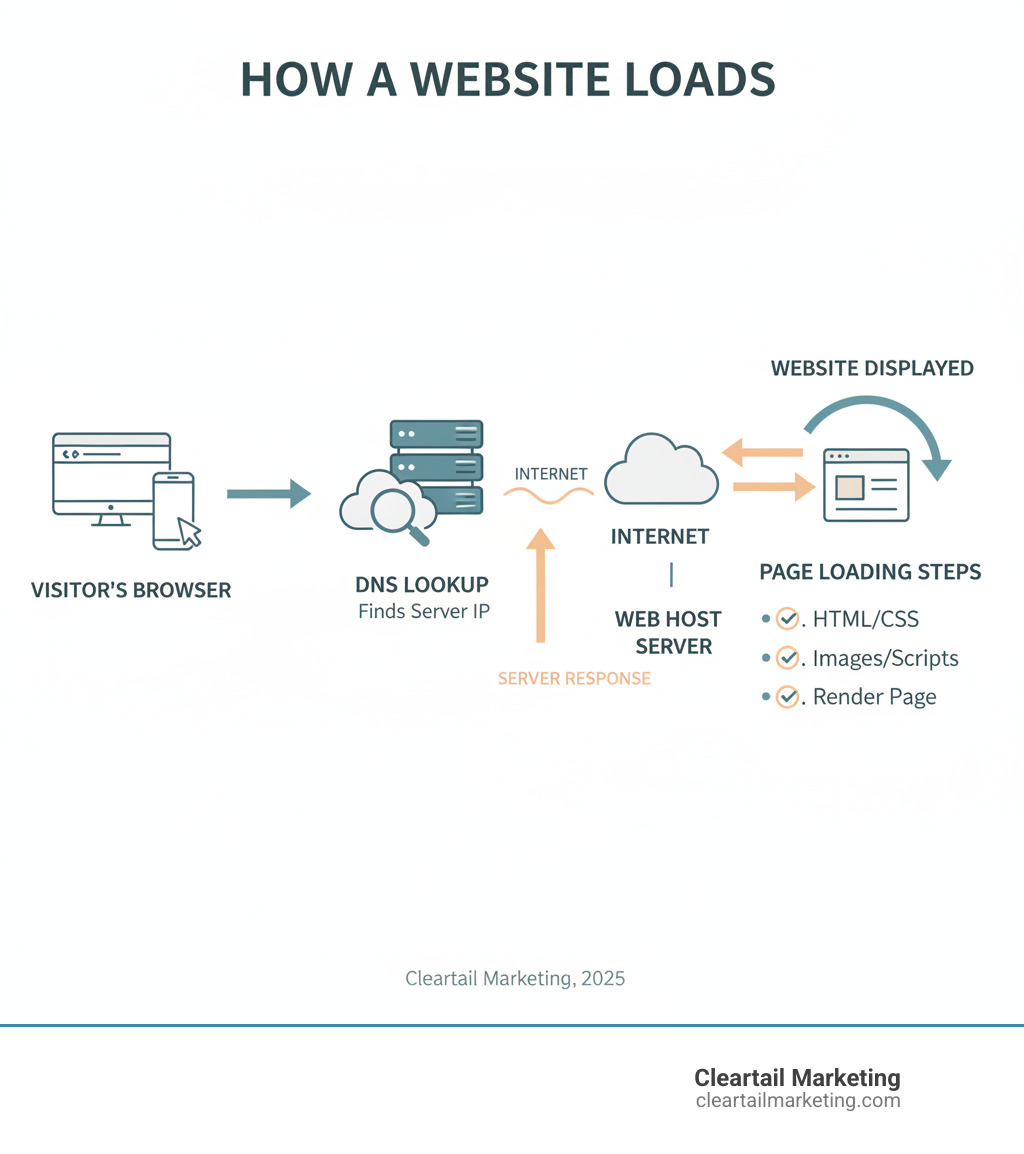
Understanding Hosting: Types and Key Terminology
Choosing the right web hosting is like picking the perfect home for your business. Just as you wouldn’t put a growing family in a studio apartment or a single person in a mansion, your website needs hosting that matches its size, traffic, and ambitions.
When you’re doing a website hosting comparison, you’ll encounter several main types of hosting. Each serves different needs and budgets, much like different types of housing arrangements.
Shared hosting is the most budget-friendly option, where your website shares server resources with dozens or even hundreds of other sites. It’s like living in a busy apartment building where everyone shares the same utilities and internet connection. This works great when you’re starting out, but if one of your “neighbors” gets really popular (or problematic), it can slow down everyone else.
VPS (Virtual Private Server) hosting gives you a step up. You’re still sharing a physical server, but it’s divided into separate virtual spaces. Think of it as owning a condo – you share the building, but your unit has its own dedicated resources. You get more control and better performance than shared hosting.
Dedicated hosting means you get an entire physical server all to yourself. It’s like owning a standalone house with your own power grid and internet line. You have maximum control, security, and performance, but you’ll pay premium prices for this luxury.
Cloud hosting spreads your website across multiple connected servers. If one server has problems, another instantly takes over. It’s like having backup homes in different cities – your website stays online no matter what happens to any single server.
There are also specialized options like managed WordPress hosting, which is specifically optimized for WordPress sites with features like automatic updates and expert support. Reseller hosting lets you become a mini-hosting provider yourself, purchasing resources wholesale and selling them to your own clients.
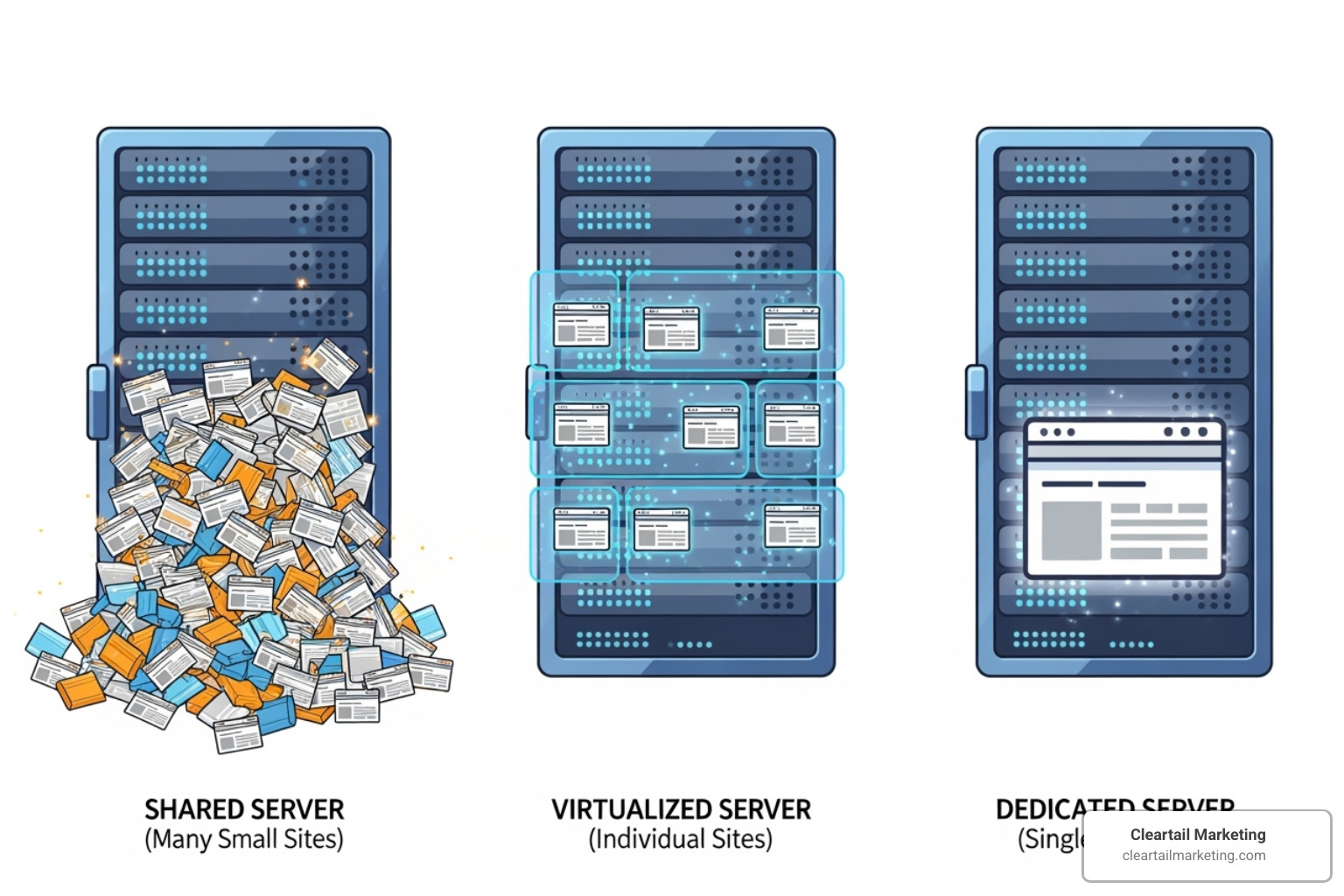
Shared vs. VPS vs. Dedicated vs. Cloud Hosting
Understanding the real differences between these hosting types helps you make smarter decisions for your business.
Shared hosting keeps things simple and affordable. You’ll get basic storage, bandwidth, and usually a user-friendly control panel like cPanel. The downside? Since you’re sharing resources with other websites, your site’s performance depends partly on what your “server neighbors” are doing. If another site gets a traffic spike, your site might slow down too. Shared hosting plans usually cost between $2 and $20 a month, making them perfect for new businesses testing the waters.
VPS hosting gives you dedicated chunks of CPU, RAM, and storage that other sites can’t touch. You also get root access, meaning you can install custom software and configure things exactly how you want. Performance stays consistent because you’re not affected by other websites’ traffic spikes. Pricing typically ranges from $2 to $110 per month, depending on how much power you need.
Dedicated server hosting puts you in complete control. Every bit of processing power, memory, and storage belongs to your website alone. This delivers the fastest speeds and highest security, perfect for high-traffic sites or businesses handling sensitive data. The trade-off is cost – dedicated servers usually start around $47 monthly and can reach $540 or more for enterprise-level configurations.
Cloud hosting offers incredible scalability. Need more resources during a big sale or product launch? Cloud hosting can instantly scale up. Traffic back to normal? It scales back down, often saving you money. The distributed nature means excellent reliability, and pricing often follows a pay-as-you-go model. Managed cloud solutions typically start around $10-$20 monthly but can scale much higher based on usage.
Web Host vs. Domain Registrar: What’s the Difference?
This confusion trips up almost everyone when they’re starting their first website. Let me clear this up with a simple analogy.
Your domain name (like cleartailmarketing.com) is your website’s street address. A domain registrar is like the city hall that officially records your address and makes sure mail gets delivered to the right place. When you register a domain, you’re essentially leasing that address for a specific period, usually one to several years.
Your web host is the actual land and building at that address. It’s where your website’s files, images, and content physically live on powerful computers called servers. When someone types your domain name into their browser, the domain registrar’s system points them to your web host’s servers, which then deliver your website to their screen.
Many companies offer both domain registration and web hosting services under one roof. While this seems convenient, we often recommend using separate providers for each service. This gives you more flexibility to switch hosts without losing your domain, often provides better pricing, and lets you choose specialists who excel at their specific service.
The key thing to remember in any website hosting comparison is that domains and hosting work together but serve completely different functions. You need both for a functioning website, but they don’t have to come from the same company.
The Ultimate Website Hosting Comparison Checklist
Finding the perfect web host doesn’t have to feel like searching for a needle in a haystack. After working with dozens of hosting providers over the years, I’ve learned that the best website hosting comparison comes down to focusing on what actually matters for your business success.
Think of choosing a web host like picking a business partner – because that’s essentially what you’re doing. You want someone reliable, secure, responsive when you need help, and honest about pricing. Let’s break down the key factors that separate the great hosts from the merely adequate ones.
Performance: Uptime Guarantees and Site Speed
Your website’s performance directly impacts your bottom line. I’ve seen businesses lose thousands of dollars in sales because their site went down during a busy shopping weekend or loaded so slowly that customers gave up and went to a competitor.
Uptime percentage is the first metric to examine. Most hosts proudly display their 99.9% uptime guarantee, which sounds fantastic until you do the math. That “only” 0.1% downtime translates to about nine hours of your site being offline each year. For most businesses, that’s nine hours too many.
The reality is that truly excellent hosts often achieve much better uptime. Some providers like Hostwinds advertise 99.9999% uptime guarantees, while Liquid Web even offers 100% uptime (though always read the fine print for exclusions). Always check the Service Level Agreement to understand what happens if they don’t meet their promises.
Site load time matters just as much as uptime. Your website should load in under three seconds – not because it’s a nice round number, but because bounce rate increases by 32% when loading time goes from one to three seconds. Every second counts when you’re trying to keep visitors engaged.
Two technologies can dramatically improve your site’s speed. A Content Delivery Network (CDN) stores copies of your website’s images, CSS files, and other static content on servers around the world. When someone in Tokyo visits your Chicago-based business website, they’ll load it from a server in Asia rather than waiting for data to travel across the Pacific. SiteGround recently upgraded their CDN to use Google Edge servers with AnyCast routing, which is a fancy way of saying “really fast.”
Server-level caching is like having your host remember the most popular pages on your site so they can serve them instantly instead of rebuilding them from scratch every time. It’s the difference between a waiter memorizing your regular order versus having to ask the kitchen to prepare everything fresh each visit.
Security: Must-Have Protective Features
Website security isn’t optional anymore – it’s like wearing a seatbelt. You hope you’ll never need it, but you’ll be grateful it’s there when something goes wrong.
SSL certificates encrypt the data flowing between your website and your visitors’ browsers. Without one, browsers will literally warn people that your site is “not secure,” which is about as welcoming as a “Beware of Dog” sign on your front door. The good news is that Google penalizes sites without SSL certification, so most reputable hosts now include free SSL certificates as standard.
DDoS protection defends against attacks where cybercriminals flood your server with fake traffic, trying to overwhelm it and take your site offline. It’s like having a bouncer who can spot troublemakers and keep them out of your digital storefront. Many hosts, including HostGator and Liquid Web, build this protection right into their service.
A Web Application Firewall (WAF) acts as a smart security guard for your website, examining every visitor and blocking those who seem suspicious or malicious. It protects against common attacks like SQL injection and cross-site scripting – technical terms for “bad people trying to break your website.”
Malware scanning regularly checks your site for malicious software that could steal your data, redirect your visitors to scam sites, or turn your website into a digital zombie. Think of it as a regular health checkup for your site.
Automated backups are your safety net. Whether a hacker attacks your site, you accidentally delete important files, or an update goes horribly wrong, daily backups mean you can restore everything to working order. Some hosts include this free, others charge extra – always confirm the backup frequency and how easy it is to restore your site.
Support and Ease of Use
Even if you’re technically savvy, you’ll eventually need help. The quality of customer support often determines whether a small problem becomes a major headache or gets resolved quickly.
24/7 support isn’t just a nice-to-have feature – it’s essential. Website problems don’t wait for business hours, and neither should solutions. Look for multiple support channels including live chat for quick questions, phone support for urgent issues where you need to actually talk to someone, and a ticket system for complex problems that need detailed explanations.
IONOS takes a unique approach by assigning each customer a dedicated advisor, while SiteGround has won multiple awards for customer support – and trust me, those awards are well-deserved based on our experience working with them.
Control panels are where you’ll manage your website’s behind-the-scenes operations. cPanel is the industry standard that most people find intuitive, while Plesk is another solid option, especially for Windows hosting. Many hosts create their own custom dashboards like Hostinger’s hPanel or SiteGround’s Site Tools, which can offer a more streamlined experience custom to their specific services.
Decoding Pricing: A Key Part of Your Website Hosting Comparison
Here’s where many people get tripped up in their website hosting comparison: focusing only on the advertised price instead of understanding the full cost picture.
Introductory rates are the shiny discounts hosts use to attract new customers – sometimes as low as $1-$3 per month. These deals are real, and you should absolutely take advantage of them, but don’t mistake them for your long-term costs.
Renewal costs are where reality sets in. After your initial contract expires, prices typically jump by 200-300%. SiteGround’s WordPress hosting, for example, starts at $3 per month but renews at $18 monthly. This isn’t a scam – it’s standard practice across the industry. Just make sure you know what you’re signing up for.
Contract length affects your discount level. Longer commitments usually mean bigger savings, but consider whether you’re comfortable locking in for three years with a host you’ve never used before. Money-back guarantees help here – most reputable hosts offer 30-day guarantees, though some like DreamHost offer up to 97 days and InMotion Hosting provides 90 days.
Watch out for hidden fees during checkout. Hosts love to suggest add-ons like premium security features, daily backups, or website builders that can double your monthly cost. Only buy what you actually need.
For budgeting purposes, shared hosting plans usually cost between $2 and $20 a month, VPS hosting ranges from $2 to $110 per month, and dedicated hosting can reach $540 or more monthly for high-end configurations.
At Cleartail Marketing, we always tell our clients to focus on value rather than just price. The cheapest option often costs more in the long run through poor performance, security issues, or terrible support when you need help most.
2025’s Top Web Hosts: A Head-to-Head Website Hosting Comparison
After helping 90+ B2B companies find the right hosting solutions and testing dozens of providers ourselves, we’ve narrowed down the field to four standout performers for 2025. Each excels in different areas, so the “best” choice really depends on your specific needs and priorities.
Here’s how our top picks stack up in our comprehensive website hosting comparison:
| Provider | Starting Price (Intro) | Renewal Price (Approx.) | Storage | “Best For” Category |
|---|---|---|---|---|
| Hostinger | $3/month | $10-$15/month | 100GB | Overall Value, E-commerce |
| SiteGround | $3/month | $18/month | 10GB | WordPress, Beginners, Support |
| GreenGeeks | $3/month | $10-$15/month | 50GB | Eco-Friendly, Budget |
| Cloudways | $11/month | $11/month (Pay-as-you-go) | 25GB | E-commerce, Scalability, Devs |
Hostinger: Best Overall Value
If you’re looking for the sweet spot between price and performance, Hostinger consistently delivers. We’ve recommended them to clients who need reliable hosting without breaking the bank, and they rarely disappoint.
What makes Hostinger shine: Their custom hPanel control panel feels modern and intuitive – a refreshing change from outdated interfaces. The built-in page speed testing tool helps you monitor performance without third-party services. Plus, their AI site generation tools can create professional-looking layouts in minutes, perfect if you’re not a designer.
Performance-wise, Hostinger impressed us with loading speeds often under one second (we’ve seen 0.8 seconds consistently). Their 99.9% uptime guarantee holds up in real-world testing, and you get generous resources even on entry-level plans – 100GB storage and support for 25,000 monthly visitors.
The downsides? Customer support can be hit-or-miss via live chat, sometimes taking longer than we’d like. And like most hosts, renewal prices jump significantly after your introductory period, though they remain competitive.
Pricing starts at just $3 per month, making it accessible for new businesses and side projects. The AI tools and modern interface make it particularly appealing for entrepreneurs who want to get online quickly. See at Hostinger to explore their current offers.
SiteGround: Best for WordPress & Beginners
SiteGround has earned a special place in our hearts (and our client recommendations) for one simple reason: they make WordPress hosting feel effortless. Their support team has won multiple awards for customer support, and after working with them for years, we understand why.
Their Site Tools control panel is genuinely a pleasure to use. Complex tasks like staging sites, managing databases, or setting up SSL certificates become point-and-click simple. For WordPress sites specifically, they’ve built custom plugins (Speed Optimizer and Security Optimizer) that integrate seamlessly with their hosting environment.
Performance benefits from Google Cloud infrastructure, delivering solid speeds around 1.1 seconds and reliable 99.9% uptime. Their CDN uses Google Edge servers with AnyCast routing, which sounds technical but simply means your site loads faster worldwide.
The trade-offs: Renewal pricing jumps from $3 per month to $18 per month – one of the steeper increases we’ve seen. The entry-level plan includes only 10GB storage, which can feel cramped if you have lots of images or videos.
Despite the price increase, SiteGround remains our go-to recommendation for WordPress beginners and anyone who values exceptional support. When something goes wrong (and it eventually will), having knowledgeable humans ready to help makes all the difference.
GreenGeeks: Best Eco-Friendly Option
Running a business means making choices that align with your values. If environmental responsibility matters to you, GreenGeeks proves you don’t have to sacrifice performance for principles.
Their eco-friendly approach goes beyond marketing speak. GreenGeeks’ eco-friendly approach includes investing in renewable energy credits worth three times their actual power consumption. They also partner with One Tree Planted, planting one tree for every hosting account – a nice touch that adds up over time.
Performance-wise, they deliver solid results with loading speeds around 1.2 seconds and the standard 99.9% uptime guarantee. Free SSL certificates, domain registration for the first year, and site migration help reduce your setup costs and complexity.
The limitations: Their control panel interface feels less polished than newer competitors, though it gets the job done. Like most hosts, renewal rates climb after promotional periods end.
Pricing starts at $3 per month, making environmental responsibility accessible for small businesses. If you want to reduce your digital footprint without compromising your website’s performance, GreenGeeks offers a compelling solution.
Cloudways: Best for E-commerce & Scalability
Cloudways takes a different approach that appeals to growing businesses and developers. Instead of traditional shared hosting, they provide managed cloud hosting that bridges the gap between simple hosting and complex cloud infrastructure.
The multi-cloud advantage means you can deploy on DigitalOcean, AWS, Google Cloud, or Vultr – getting enterprise-level infrastructure without needing a system administrator. Recently acquired by DigitalOcean, they’ve strengthened their cloud offerings even further.
Pay-as-you-go pricing eliminates long-term contracts and scales with your business. Busy holiday season? Scale up resources instantly. Quiet summer months? Scale down and save money. This flexibility proves invaluable for e-commerce sites with seasonal traffic patterns.
Performance features like Nginx, Apache, Varnish, Redis, and Memcached create optimized environments for demanding applications. Git integration, SSH access, and staging environments make developers happy, while automated backups and security patches keep business owners comfortable.
The learning curve can intimidate absolute beginners used to traditional hosting interfaces. Email hosting isn’t included, requiring third-party solutions. For resource-intensive applications, costs can exceed shared hosting significantly.
Starting at $11 per month, Cloudways costs more upfront but offers transparent pricing – that monthly rate stays consistent rather than jumping after promotional periods. For growing e-commerce sites or businesses expecting traffic spikes, the scalability justifies the investment.
A Quick Website Hosting Comparison for Specific Needs
Every business has unique requirements, so here’s our rapid-fire guidance for specific situations:
For beginners, SiteGround tops our list with its intuitive Site Tools and award-winning support team ready to help. Hosting.com (formerly A2 Hosting) also excels here with Turbo servers for speed, while Bluehost offers WordPress-recommended simplicity and DreamHost provides an unusually long money-back guarantee for peace of mind.
E-commerce sites benefit most from Cloudways’ scalable cloud infrastructure that grows with your store. Nexcess specializes in WooCommerce and Magento optimization, Liquid Web focuses intensively on WooCommerce hosting with robust support, and Hostinger delivers excellent value with helpful AI tools for online stores.
Budget-conscious users should consider Hostinger for its excellent feature-to-price ratio, IONOS for very low introductory rates (watch those renewal increases), AccuWeb Hosting for wallet-friendly long-term pricing, and Namecheap for almost-free plans perfect for simple sites.
Media-heavy websites like photography portfolios perform best on Cloudways plus WordPress for scalability and performance, though compress your photos and videos to control storage costs. InMotion Hosting also works well with fast SSD storage that benefits media-rich sites.
When support quality matters most, SiteGround leads with award-winning, responsive, knowledgeable representatives. IONOS assigns each customer a personal support agent, while InMotion Hosting offers praised US-based support, though wait times can occur during busy periods.
Frequently Asked Questions about Website Hosting
At Cleartail Marketing, we’ve been helping businesses make smart hosting decisions since 2014. During our website hosting comparison consultations, the same questions come up repeatedly. Let me share the answers that have helped our 90+ B2B clients avoid costly hosting mistakes.
Are free web hosting services a good idea?
I’ll be direct with you: free hosting is almost never a good idea for serious businesses. While options like 000webhost might seem tempting when you’re watching every penny, they create more problems than they solve.
Free hosting services severely restrict your storage space – often just a few hundred megabytes. That’s barely enough for a basic website with a handful of images. Bandwidth caps mean your site goes offline when you get too many visitors, which is exactly when you need it most.
The biggest red flag? Forced advertisements on your website. Imagine a potential customer visiting your professional service page only to see ads for your competitors plastered across the top. It destroys credibility instantly.
Customer support is practically non-existent with free hosting. When your site crashes at 2 AM before a big presentation, you’re completely on your own. Most free hosts also force you to use unprofessional subdomains like yourcompany.freehost.com instead of your own domain name.
The only time free hosting makes sense is for testing purposes – maybe you’re learning web development or need a temporary placeholder. For anything that matters to your business revenue, invest in proper hosting. The few dollars you save monthly aren’t worth losing thousands in potential customers.
How much should I pay for website hosting?
This question always makes me smile because it’s like asking “How much should I pay for a car?” The answer depends entirely on what you need and what you’re trying to accomplish.
Shared hosting is your economy car option, running $2 to $20 per month. It’s perfect for small businesses, personal blogs, or startups just getting their feet wet. You’re sharing server resources with other websites, which keeps costs low but can slow things down during traffic spikes.
VPS hosting costs between $2 to $110 per month and gives you more control and dedicated resources. Think of it as upgrading from a shared apartment to your own condo. It’s ideal when your business is growing and you need more reliable performance.
Dedicated hosting is your luxury option, starting around $47 and climbing past $540 per month. You get an entire server to yourself, which is necessary for large enterprises or websites with massive traffic volumes.
Cloud hosting offers flexible pricing, typically starting at $10-$20 monthly for managed services. You pay for what you use, making it perfect for businesses with fluctuating traffic or seasonal spikes.
Here’s the crucial part that catches many business owners off guard: always look at renewal costs, not just the introductory rates. That $3/month deal might jump to $18/month after your first year. We always tell our clients to focus on value over price – what you get for your money matters more than finding the absolute cheapest option.
What recent changes in the hosting market should I know about?
The hosting world has shifted dramatically over the past year, and staying informed helps you make better decisions during your website hosting comparison.
Price increases have hit nearly every major provider. While those eye-catching introductory rates remain low, renewal costs have jumped significantly from 2024 to 2025. We’re seeing increases of 20-30% or more across the board, making it more important than ever to read the fine print.
AI integration is revolutionizing how people build websites. Hostinger’s AI site generation tools can create a complete website layout in minutes, while other providers are adding AI-powered optimization features. It’s making professional-looking websites accessible to complete beginners.
The eco-friendly hosting movement is gaining serious momentum. Companies like GreenGeeks aren’t just talking about sustainability – they’re investing in renewable energy and planting trees for every hosting account. Businesses increasingly want their hosting choices to align with their environmental values.
Managed cloud hosting is exploding in popularity. Services like Cloudways make powerful cloud infrastructure (AWS, Google Cloud, DigitalOcean) accessible without requiring a computer science degree. You get enterprise-level scalability with user-friendly management.
Performance features have become the new battleground. Providers are implementing advanced caching systems, switching to faster NVMe SSD storage, and optimizing for modern web servers like LiteSpeed. The difference in site speed between providers has become more pronounced.
Many hosts are ditching generic control panels for custom solutions. SiteGround’s Site Tools and Hostinger’s hPanel offer more streamlined, WordPress-optimized experiences than traditional cPanel setups.
Behind the scenes, there’s been a major Linux distribution shift. With CentOS reaching end-of-life, providers like GreenGeeks are migrating to alternatives like AlmaLinux. It won’t affect your day-to-day experience, but it ensures continued security and stability.
These changes reflect a hosting market that’s becoming more specialized, performance-focused, and user-friendly – while also adjusting prices to match these improvements.
Conclusion
Choosing the right web host doesn’t have to feel like solving a puzzle with a thousand pieces. Through our comprehensive website hosting comparison, we’ve explored the key factors that matter most: performance, security, support quality, and honest pricing.
The truth is, there’s no magical “best host for everyone.” Your perfect hosting partner depends entirely on your specific situation. Are you a complete beginner who needs hand-holding? SiteGround’s award-winning support team might be your best friend. Running a growing online store that needs to handle traffic spikes? Cloudways’ scalable cloud infrastructure could be exactly what you need.
Maybe you’re budget-conscious but still want solid performance – that’s where Hostinger shines with its excellent value proposition. Or perhaps you care deeply about your environmental impact and want a host that shares those values, making GreenGeeks an ideal match.
Here’s what we’ve learned after years of helping businesses make these decisions at Cleartail Marketing: the cheapest option rarely saves you money in the long run. Those tempting $1-per-month introductory rates can quickly turn into expensive headaches when your site goes down during a crucial sales period or loads so slowly that customers give up and shop elsewhere.
Instead of chasing the lowest price, focus on finding the best value. Look at what you’re actually getting for your money. Does the host offer reliable uptime guarantees? Do they include essential security features like SSL certificates and malware scanning? Can you reach their support team when you need help at 2 AM?
Don’t forget to peek behind the curtain at renewal pricing. That $3-per-month plan might jump to $18 when it’s time to renew. Factor these real costs into your decision from the start, so there are no unpleasant surprises down the road.
Your website is often the first impression potential customers have of your business. It deserves a solid foundation that won’t let you down when it matters most. Whether you’re launching your first website or switching from a host that’s not meeting your needs, taking time for a thorough website hosting comparison is one of the smartest investments you can make.
At Cleartail Marketing, we’ve seen how the right hosting choice can transform a business’s online presence. We’ve also witnessed the frustration and lost opportunities that come from poor hosting decisions. If you need guidance navigating these choices or want expert help optimizing your entire digital strategy, we’re here to support your success.
Learn more about the true cost of website hosting to ensure your digital foundation is as strong as your business ambitions.
